
Web3 USDT Component
Embed a ready-made Web3 component that lets customers pay USDT from Chui Wallet or any browser wallet.
Overview
The Web3 USDT Component handles wallet connection, network validation, and ERC-20 transfer signing in a single embeddable element. Drop it on your USDT checkout page and it takes care of the browser wallet interaction.
Embed the Component
<!-- Include the component script -->
<script src="https://blockonomics.co/js/web3-payment.js"></script>

<!-- Place the component in your HTML -->
<web3-payment
  id="web3_payment"
  order_amount="10"
  receive_address="YOUR_USDT_RECEIVE_ADDRESS"
></web3-payment>
Attributes
| Attribute | Description |
|---|---|
order_amount | Amount of USDT the customer must pay |
receive_address | Your USDT (ERC-20) receiving address |
testmode | Optional. Shows a test wallet instead of a real one, for stores in test mode |
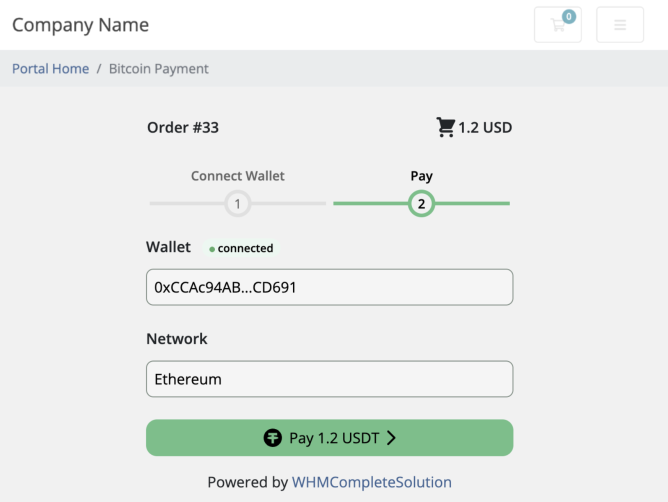
Screenshot of web3 USDT component on checkout page
Handle Payment Submission
When the customer approves the transaction in their wallet, the component fires onTxnSubmitted with the txhash and crypto (lowercase, such as "usdt"):
const web3Payment = document.getElementById('web3_payment');

web3Payment.onTxnSubmitted = function(result) {
  const { crypto, txhash } = result;

  // Send to your backend for monitoring
  fetch('/api/payments/confirm', {
    method: 'POST',
    headers: { 'Content-Type': 'application/json' },
    body: JSON.stringify({ txhash, crypto })
  });
};
Register for Monitoring
Your backend must submit the txhash to Blockonomics so it can track confirmation.
If you are using Raw Payments API:
- Associate the current order internally in the DB with the
txhash. - Call Monitor USDT Transaction.
If you are using Payment Intents:
- Submit the hash to Payer API. This automatically takes care of order/
txhashassociation.
Handle Callbacks
Once registered, Blockonomics sends a callback to your server when the transaction confirms on-chain. Mark the order as paid at that point — not when onTxnSubmitted fires.